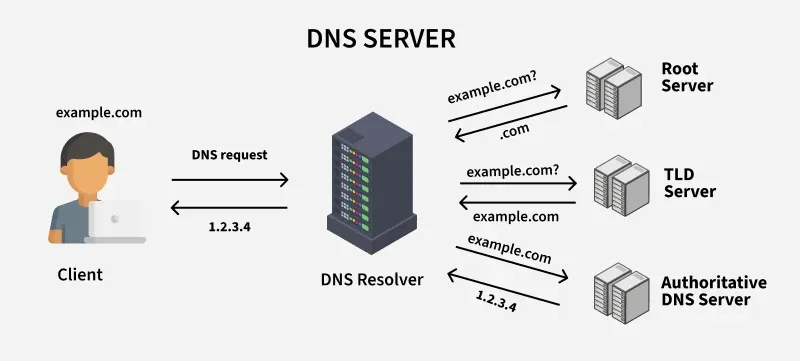
What is DNS (Domain Name System)
→ It is the phonebook of the internet. Humans access info using domain names but in the background each site is running on a machine which can be hosted on cloud machines or bare metal which have a unique public IP which is hard for humans to remember, so we use domain names that are easy to read.
→ For now, in short, we can say DNS translates domain names to IP addresses where the site is hosted. But it is not that simple (domain name ↔ IP). Before getting the IP, it sends recursive requests to different types of servers to finally get the IP.
We will discuss more about each server and the entire lifecycle of how a request is processed and resolved.
What is the dig command and when is it used
The dig command, short for Domain Information Groper, is a command-line tool used to query DNS servers. It retrieves detailed DNS information such as IP addresses (A/AAAA records), mail servers (MX records), name servers (NS records), and other DNS record types.
It's mainly used for:
- Troubleshooting DNS issues
- Verifying DNS record propagation
- Diagnosing network problems
- Querying specific DNS servers
- Performing reverse DNS lookups
Before discussing further, let's discuss DNS Recursor
→ It is the first layer where the server connects to query the IP address for the particular domain name. It receives queries from a client and first checks if there is already a cache present in the recursive server for a previous request.
→ If not cached, it will start recursively querying the DNS hierarchy. First, it will go to the root name server (resolving example: ".com"), then to the particular TLD nameserver (in this case, .com), and finally the authoritative name server, which will finally return the IP and also cache it for future queries. Recursive servers do not host any records, they just cache to reduce the load on the main servers.
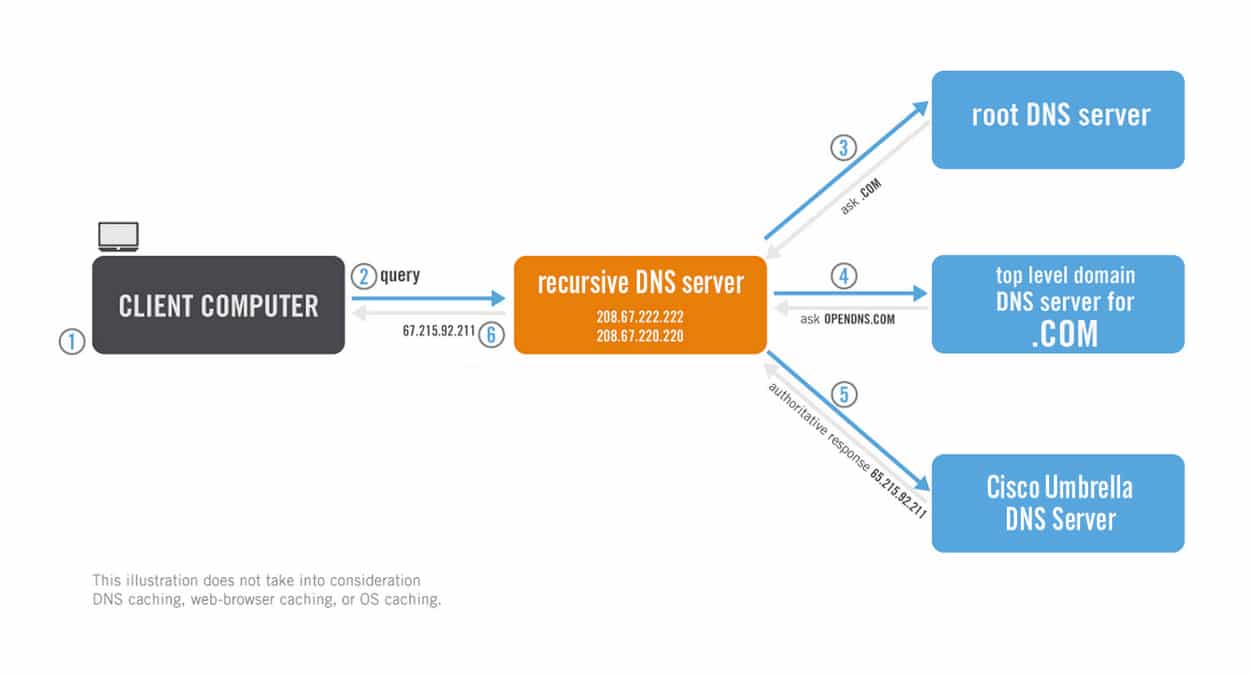
Authoritative vs Recursive DNS Nameservers (Source: Cisco Umbrella)
Understanding dig, NS, and Root Name Servers
The dig command is a powerful Linux utility used to query DNS servers for detailed information about domain names.
NS Records (Name Server Records)
NS records specify the authoritative name servers for a domain.
Key Points:
- • If no record type is specified, dig defaults to A records.
- • The AUTHORITY SECTION contains the NS records.
- • Use
dig +short example.com NSfor concise output.
What are Root Name Servers
Root servers are the first main step if cache is not in the recursor server. You can think of a root server like an index in a library that points to different racks of books. There are mainly 13 logical root name servers, each identified by a unique name and IP address.
Understanding dig com NS and TLD Name Servers
dig is a command-line tool used to query DNS servers for information about domain names.
example.com. 3600 IN NS b.iana-servers.net.
What are TLD Name Servers
→ TLD is like the specific rack of books. This nameserver is the next step in the search for a specific IP address and it hosts the last portion of the hostname.
Example (accessing google.com):
- 01A recursive resolver connects this request to a root server
- 02The root server directs the resolver to the '.com' TLD server
- 03The '.com' TLD server responds with the authoritative name servers for google.com
- 04The resolver queries these authoritative name servers to get the IP address
Authoritative Name Servers
dig google.com NS queries the authoritative name servers for the domain by requesting NS records.
Answer Section
ns1.google.com
ns2.google.com
ns3.google.com
ns4.google.com
The authoritative nameserver is the last stop in the query. It returns the IP address for the requested hostname back to the DNS Recursor.
Final DNS Resolution Cycle
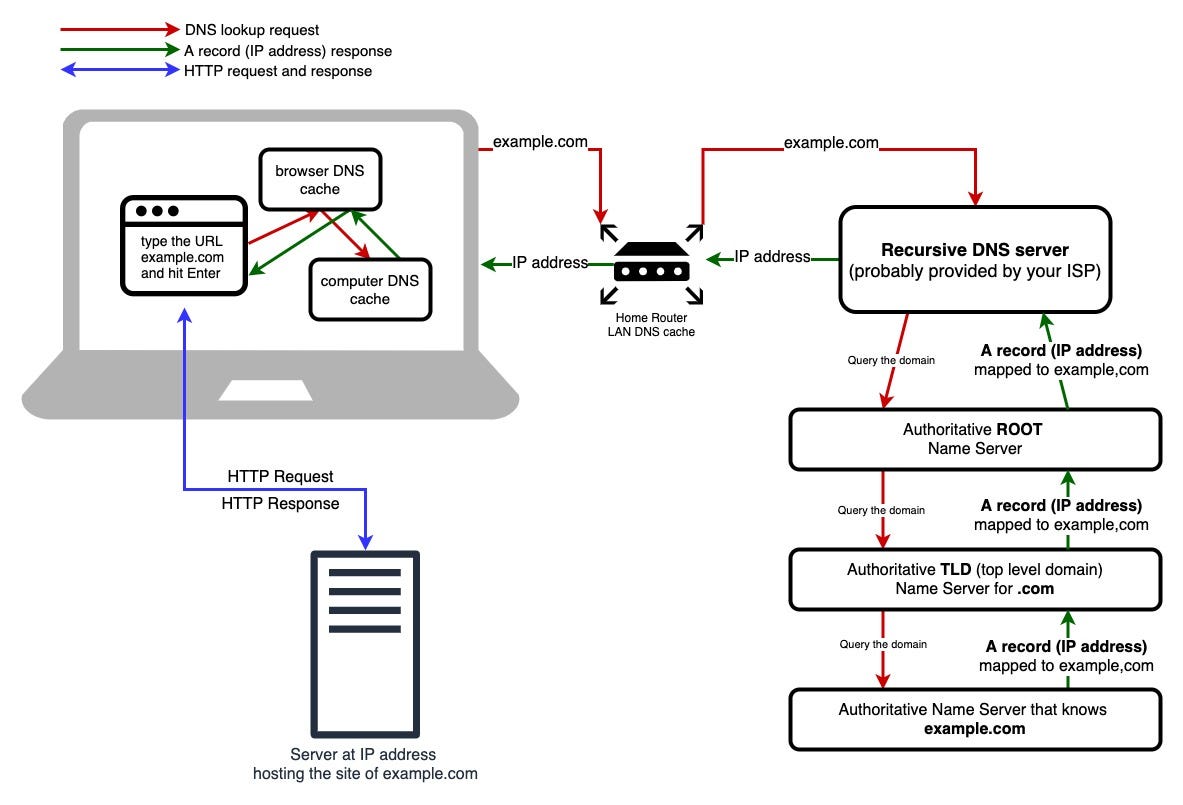
11. Client → DNS Recursor
- User enters a domain name in the browser
- The browser sends the DNS query to the DNS recursor
- The recursor first checks its cache
- If cached, the IP is returned immediately
- If not cached, the recursor starts the recursive resolution process
22. DNS Recursor → Root Name Server
- The recursor sends a query to a root name server
- Root servers do not know IP addresses
- They respond with a referral to the appropriate TLD name server
33. DNS Recursor → TLD Name Server
- The recursor queries the TLD name server
- The TLD server responds with the authoritative name servers
44. DNS Recursor → Authoritative Name Server
- The recursor queries the authoritative name server
- This server holds the actual DNS records
- It returns the final IP address
- The recursor caches the response and sends the IP back to the client